


What Should I Do If My Deposit Is Delayed On WEEX? Guide and Checklist
Deposits on WEEX typically take 5–15 minutes, depending on blockchain activity. If yours hasn't shown up after that window, don't panic — most delayed deposits trace back to one of a handful of common, identifiable causes. This guide walks through what to check first, and what's actually recoverable versus what isn't.
A quick but important note: some deposit errors — particularly sending the wrong token or using an unsupported network — can result in funds that are permanently unrecoverable. That's exactly why it's worth reading through these checks before you send anything, not just after something goes wrong.
Check These Common Issues First
1. Wrong Token Type
Make sure the cryptocurrency you sent matches the exact token listed on WEEX. Even small differences in token type can mean your deposit doesn't show up — and in the worst case, the funds may not be recoverable. For example, sending USDT under the TRC20 standard when you intended to deposit ERC20 USDT (or vice versa) can prevent your deposit from being credited normally.
2. Incorrect Address or Network
Double-check that you used the correct deposit address and the correct network for that address. Don't send ETH to a BTC address, or BNB Chain assets to an address generated for ERC20. Assets sent on one network (say, ERC20) generally cannot be recovered if sent to an address expecting a different network (like BNB Chain or OPBNB) — wrong-network deposits are one of the most common reasons funds go missing, and they're often unrecoverable once sent.
3. Below the Minimum Deposit Amount
WEEX sets a minimum deposit amount for each token and network, shown on the deposit page itself. If you send an amount below that minimum, it won't be credited to your account — and depending on the asset, it may not be automatically returned either. For instance, TRC20 and ERC20 USDT deposits below 1 USDT are typically not credited. Always check the minimum listed on the deposit page for your specific token and network before sending.
4. Irretrievable Errors (Wrong-Network Misdeposits)
Some mistakes simply can't be undone. Sending an asset to a network WEEX doesn't support for that token — for example, sending via OPBNB to an address that isn't compatible with that network — typically cannot be fixed after the fact. This is why it's worth being extra careful about the token, network, address, and minimum amount every single time, even if you've deposited successfully before. WEEX's own deposit guide on avoiding chain and token mismatches walks through these scenarios in more detail.
What to Do If Your Deposit Hasn't Arrived
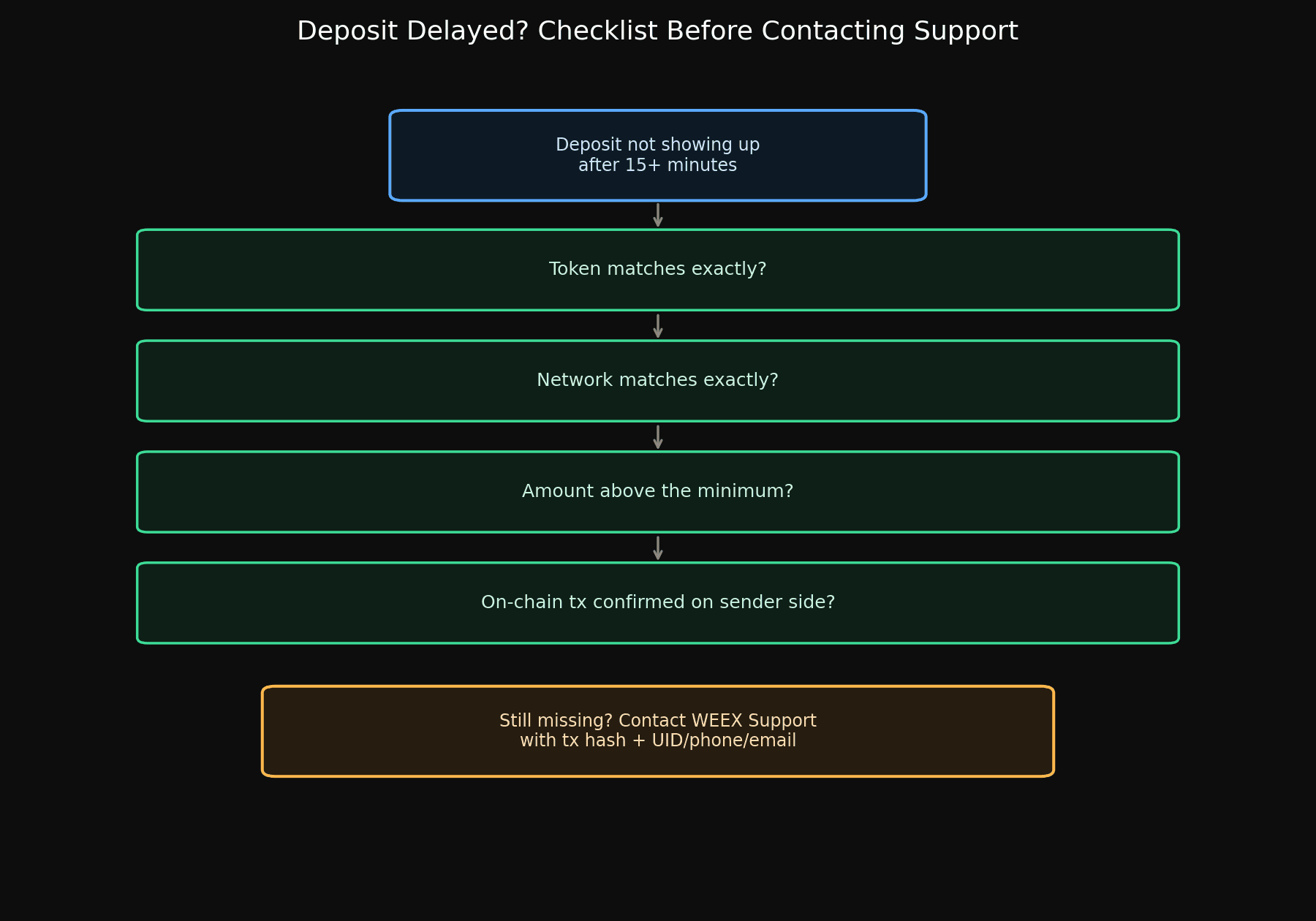
- Confirm the transaction actually went through on your end. Check your sending wallet or exchange for a completed transaction hash/ID. If the transaction is still pending on your sending platform, the delay may not be on WEEX's side at all.
- Re-verify the token, network, address, and amount you used, against what's shown on the WEEX deposit page for that asset — this rules out the four issues above before assuming anything else is wrong.
- Check whether you met the minimum deposit amount for that specific token and network combination.
- Wait for blockchain confirmation if the transaction is confirmed as sent but still processing — deposit crediting depends on the number of confirmations the specific network requires, which can take longer during periods of congestion.
- Contact WEEX support with your transaction details if you've ruled out the above and the deposit still hasn't appeared. Have your transaction hash, the token and network used, and your account UID, phone number, or email ready.
Getting Help from WEEX Support
If you're unsure about any of the checks above before sending funds, it's worth asking WEEX support first rather than after the fact — especially for wrong-network and wrong-token errors, prevention is far more reliable than recovery. You can reach out via WEEX's official Telegram support at @weexencs with questions before you deposit.
If your deposit is already delayed and you need help now, WEEX's live chat team is available at @weikecs, or through the live chat icon directly on the WEEX site and app.

Prevention Checklist for Future Deposits
- Always match the token symbol exactly to what's shown on the WEEX deposit page.
- Always match the network (e.g., TRC20, ERC20, BEP20) between your sending wallet and the WEEX deposit address.
- Check the minimum deposit amount for your specific token and network before sending.
- Copy the deposit address fresh each time rather than reusing an old one from memory.
- If you're depositing a large amount or using a network for the first time, consider sending a small test amount first.
- When in doubt, ask support before sending, not after.
Final Thoughts
Most deposit delays resolve themselves once the blockchain finishes confirming the transaction — but the ones that don't resolve are almost always tied to a token or network mismatch, or an amount below the required minimum. Since some of these errors can't be reversed once funds are sent, the checklist above is worth reviewing before your next deposit, not just when something goes wrong. WEEX's fee schedule and minimum deposit amounts for each asset are published on the official Rate Standards page.
WEEX does not offer services to users in the United States, its territories, or certain other restricted jurisdictions. Please review the Terms of Use for the current list of excluded jurisdictions and eligibility requirements before depositing funds.
Related articles:

Gainers


