
WEEX launches BBO Order(Best Bid Offer)

 Prefer us on Google

What is BBO?
BBO, also known as best bid offer, is a type of limit order. BBO allows traders to quickly set limit order prices that align with the current Queue 1, Queue 5, Counterparty 1, or Counterparty 5 prices, potentially facilitating faster order execution and better price matching. When a BBO order is placed, it is automatically adjusted to the best available price at the time of order placement.
How does BBO orders work?
When you place a BBO order, the price is determined by the BBO option you select:
Counterparty 1: For a buy order, this would be the lowest current ask price. For a sell order, it would be the highest bid price.
Queue 1: For a buy order, this would be the highest current bid price. For a sell order, it would be the lowest ask price.
Counterparty 5: For a buy order, this would be the 5th lowest current ask price. For a sell order, it would be the 5th highest bid price.
Queue 5: For a buy order, this would be the 5th highest current bid price. For a sell order, it would be the 5th highest ask price.
How is BBO different from other order types?
BBO orders automatically adjust to the best available price at the time of order placement, rather than at a specific price point that you input.
BBO orders:
Dynamic pricing: BBO orders dynamically adjust to the best-available bid or ask price at the time of order placement, such as Queue 1, Queue 5, Counterparty 1 or Counterparty 5.
Partial fulfillment and remaining quantity: If a BBO order is partially filled due to limited availability at the best price, the unfilled portion remains open in the order book at the matched price. This differentiates BBO orders from market orders, as they do not move to the next available price but stay at the initially matched price.
Non-BBO limit orders:
No automatic adjustment at order placement: Unlike BBO limit orders, these orders do not adjust to best bids or asks in the order book automatically when placing orders.
Market orders:
Instant execution at current price: Market orders execute immediately at the current market price, offering no control over the execution price.
Potential for slippage: They can experience slippage, filling at progressively worse prices until the entire order is completed.
-- Price
How to use BBO?
How to place BBO orders:
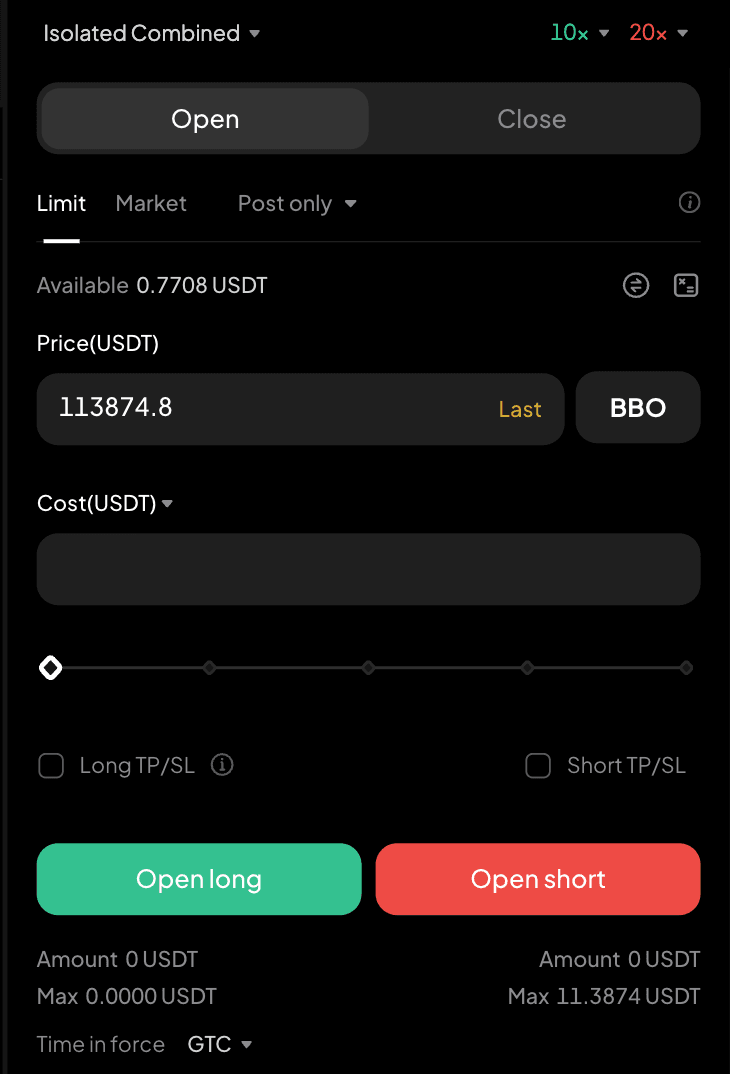
Switch to Limit order In the limit order menu (between Limit and BBO), select BBO. Select your preferred option, such as Counterparty 1, Counterparty 5, Queue 1, or Queue 5 Click the Buy or Sell button and the system will place the order accordingly.
Note: BBO is not available if you set TP/SL or when placing any of the following order type:
- Post only
- IOC
- FOK
This content is provided for general informational purposes only and doesn't constitute financial, investment, legal, or tax advice. Any events, rewards, online promotions, or related information mentioned herein should not be considered a recommendation, solicitation, or invitation to purchase, sell, trade, or otherwise deal in any crypto assets. Crypto assets are highly volatile and may result in loss. The availability of WEEX services, products, and related events may vary by region. You are responsible for ensuring that your participation is in accordance with applicable local laws and regulations.
More launches

Trade and Track Orders on the Chart: WEEX Web Spot Upgrades K-line Trading Tools

WEEX Web Spot Order Panel Gets a Major Upgrade

Compare More Markets at Once: WEEX Web Spot Launches Multi-chart Mode

Focus on Market Watching: WEEX Web Spot Launches Watch Mode

Spot Trends Before the Crowd? Try WEEX’s New Market Leaderboard with Hot, Gainers, Losers & More
WEEX P2P now supports DOP, PEN, CLP & BOB—Merchant Recruitment Now Open

WEEX Multi-Market Mode: See 6 Crypto Pairs at Once, Catch Every Breakout

WEEX Launches Multi-Chart Mode: 8 Charts, One Screen, Re-Defining Futures Trading

WEEX P2P now supports TZS & UGX—Merchant Recruitment Now Open

Moving Assets Should Be Effortless: WEEX Rebuilds the Withdrawal Experience From the Ground Up

WEEX API Fast Connect: Turn Every Sign-In Into a Live Trader in Under 10 Seconds
WEEX API Fast Connect is a one-click OAuth authorization system that lets your users link their WEEX account without ever touching an API key. Frictionless onboarding, faster conversions, higher retention — built for WEEX Broker partners.

Trade Spot Market Orders With More Control: WEEX Adds Slippage Tolerance

WEEX P2P now supports BDT & LKR—Merchant Recruitment Now Open

WEEX API Broker Program: Turn Your Trading Platform Into a Revenue Engine

WEEX Launches Depth Chart for Spot Trading

WEEX OpenAPI 101: 5 Powerful Modules, AI Trading Tools, and Grab Up to 70% Revenue Opportunities
Learn how WEEX OpenAPI connects traders, developers, AI agents, and trading platforms. Discover WEEX API features, Binance-compatible integration, automated trading workflows, revenue opportunities, and ecosystem possibilities.
WEEX Live mode: Monitor 20 trading pairs at once and trade like a pro

WEEX Makes Affiliate Access Easier on the Web and in the App