


How to Create a WEEX API Key? Follow Our Setps&Connect to WEEX Markets
The WEEX API lets developers and algorithmic traders connect directly to WEEX's spot and USDT-M futures markets — pulling market data, managing accounts, and placing orders programmatically instead of through the web or app interface. This guide walks through the full process of creating an API key, understanding its permissions, signing requests correctly, and staying within WEEX's rate limits, based on WEEX's official API documentation.
This is a technical guide, not investment advice. Building or running an automated trading system carries the same market risk as manual trading, plus additional technical risk (bugs, connectivity issues, and misconfigured permissions can all cause unintended trades or losses). Test thoroughly before running any strategy with real funds.
What the WEEX API Covers
WEEX exposes both REST and WebSocket APIs across two main product lines — Spot and USDT-M Futures — plus additional API surfaces for Broker, Copy Trading, and AI Wars integrations. Within Spot and Futures, the documentation is organized around four main categories:
- Market data — ticker info, candlesticks (across every timeframe), order book depth, and real-time trade streams via WebSocket.
- Account — balance queries and account-level information.
- Trade — placing, cancelling, and querying orders.
- Configuration/Common — server time, exchange info, and shared reference data used across endpoints.
Each of these is documented separately for Spot and Futures, since request paths, parameters, and some behaviors differ between the two products even though the underlying authentication mechanism is the same.
Step 1: Create Your API Key
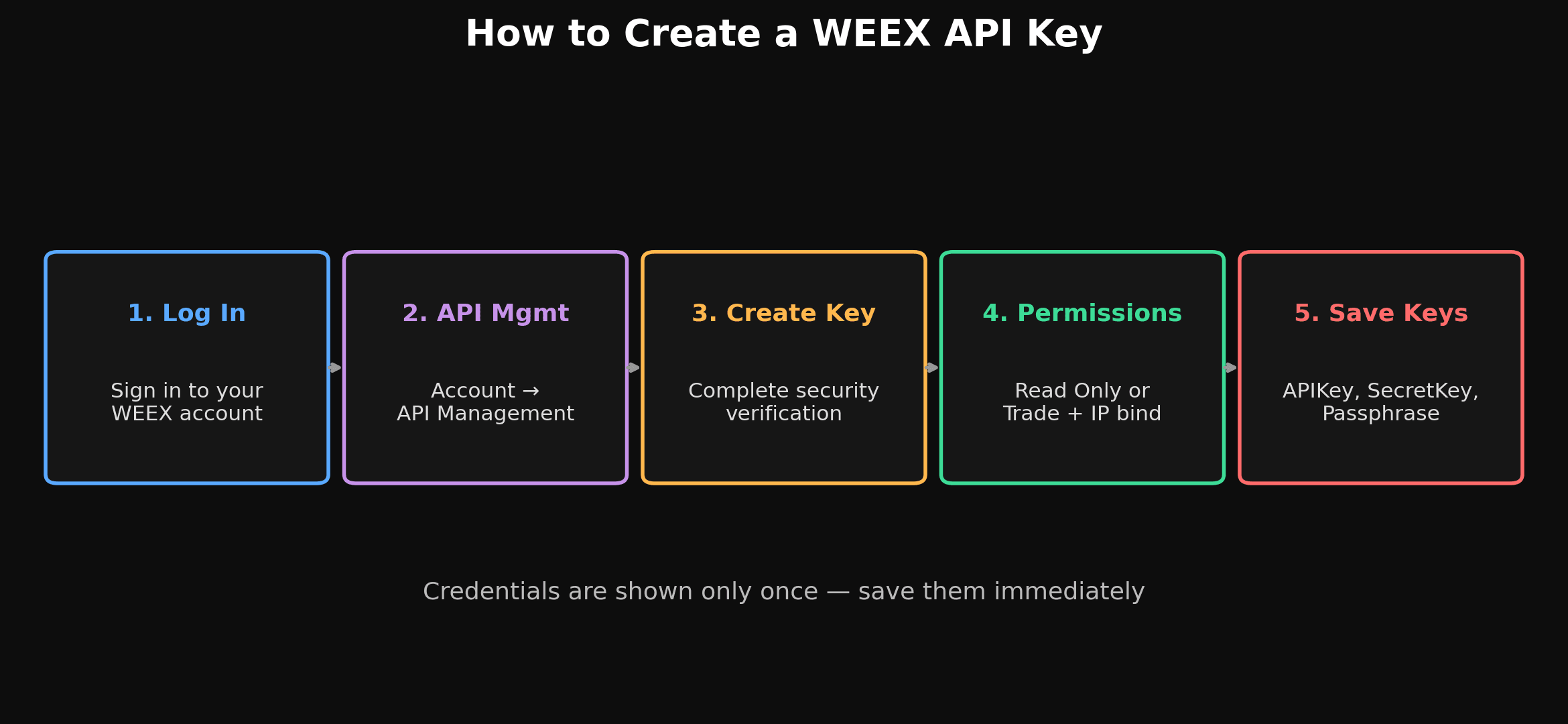
- Log in to your WEEX account on the web platform.
- Go to Account → API Management, or go directly to the Create API Key page.
- Select Create API Key and complete the required security verification (this typically involves confirming your identity through your account's existing 2FA/verification methods).
- Configure the key's permissions and — strongly recommended — bind it to a specific IP address or range (covered in detail below).
- Once created, WEEX will show you three credentials. Save all three immediately, since they are shown only once:
| Credential | What It Is |
|---|---|
| APIKey | The unique, system-generated identifier used to authenticate your requests. |
| SecretKey | A system-generated private key used to cryptographically sign your requests. |
| Passphrase | A user-defined access phrase you set yourself. This cannot be recovered if lost — you'd need to create an entirely new API key. |
Each WEEX account can create up to 10 API key groups, which is useful if you want to run separate keys for separate bots, strategies, or read-only monitoring tools rather than reusing a single key everywhere.
Step 2: Configure Permissions
Every new API key defaults to Read Only access. If you want the key to be able to place trades, you need to explicitly enable the corresponding trading permission for the product you're integrating with:
- Spot — enables trading on WEEX's spot markets.
- Futures/Contract — enables trading on WEEX's USDT-M futures markets.
These permissions are independent, so a key intended purely for pulling market data or account balances for a dashboard can be left as Read Only, while a key that's actually meant to execute a trading strategy needs the relevant trading permission explicitly turned on. As a general security practice, it's worth creating separate keys scoped to only what each specific integration actually needs, rather than a single all-permissions key used everywhere.
Step 3: Bind an IP Address (Strongly Recommended)
When creating or editing an API key, you can restrict it to only accept requests originating from a specific IP address or list of addresses. WEEX's own documentation flags this directly: an API key with no IP address binding poses a security risk, since anyone who obtains your APIKey and SecretKey could use it from anywhere. Binding your key to the server IP(s) your application actually runs from significantly reduces the impact of a leaked credential.
Understanding Public vs. Private Endpoints
WEEX's API documentation splits endpoints into two categories:
- Public APIs — used to retrieve configuration and market data (like ticker prices or order book depth). These don't require authentication and can be called without an API key at all.
- Private APIs — used for account and order management (balances, placing orders, order history). Every private request must be authenticated using WEEX's standardized signature method, described below.
Signing Your Requests (Private Endpoints)
Every private API call needs to include a valid signature so WEEX can verify the request actually came from you and hasn't been tampered with. The signature is generated as follows:
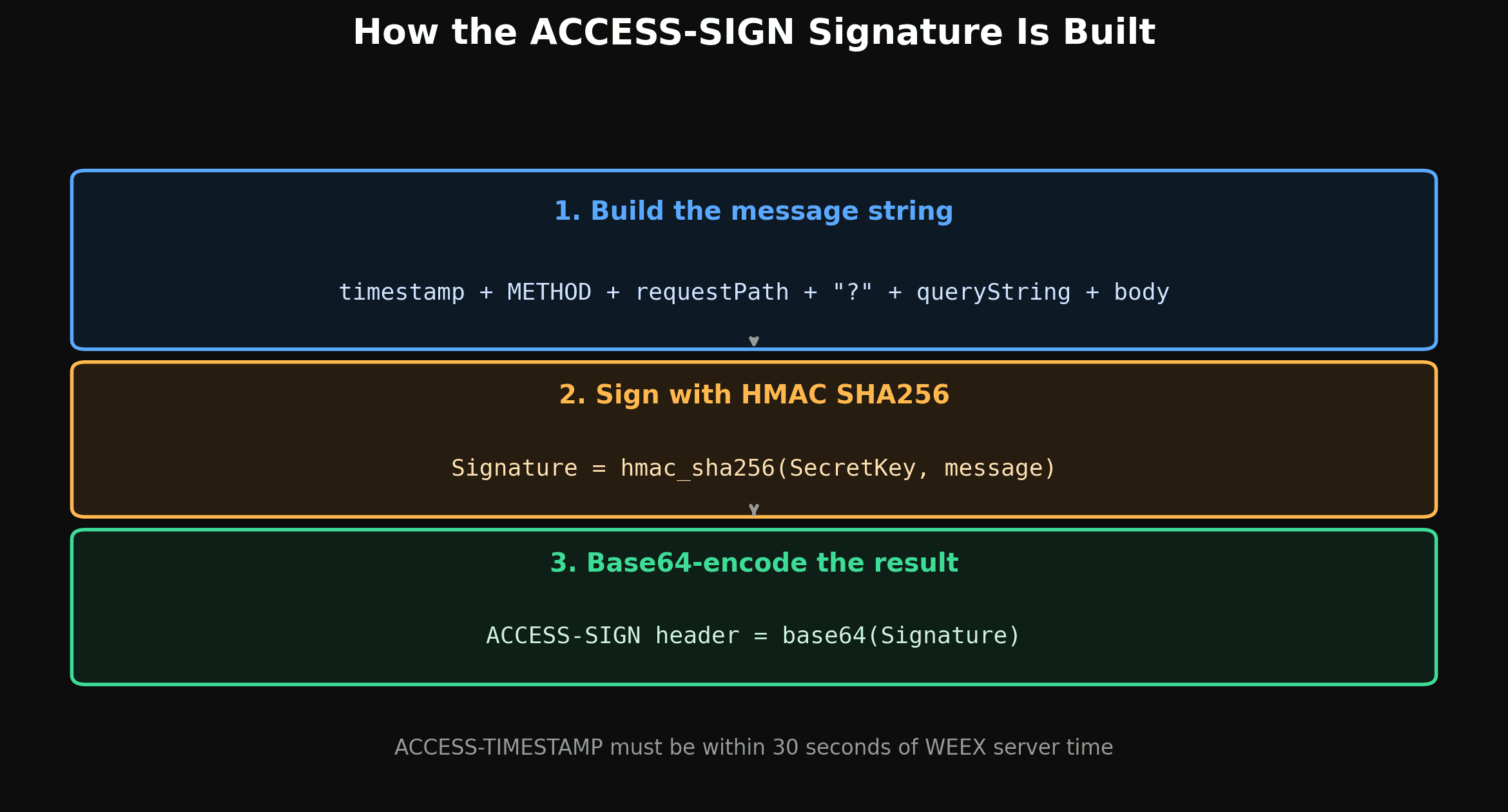
- Build the message string by concatenating:
timestamp + method (uppercase) + requestPath + "?" + queryString + body— the"?" + queryStringportion is only included if the request actually has query parameters; otherwise it's omitted. - Sign the message using HMAC SHA256 with your SecretKey:
Signature = hmac_sha256(secretKey, message). - Base64-encode the result to produce the final value for the
ACCESS-SIGNheader.
A few additional details that matter in practice:
- The
ACCESS-TIMESTAMPheader must be in milliseconds, and WEEX rejects requests where the timestamp deviates by more than 30 seconds from the server's time — if your local clock drifts, query WEEX's server time endpoint and sync against it rather than relying on your machine's local clock. - GET requests pass parameters via the query string; POST requests pass parameters as a JSON body; DELETE requests may use either, depending on the specific endpoint.
- The
methodvalue in the signature string must be uppercase (GET,POST,DELETE).
Example — signing a GET request (fetching market depth for BTCUSDT):
timestamp = 1591089508404
method = "GET"
requestPath = "/api/v3/market/depth"
queryString = "symbol=BTCUSDT&limit=20"

message = "1591089508404GET/api/v3/market/depth?symbol=BTCUSDT&limit=20"
Example — signing a POST request (placing an order):
timestamp = 1561022985382
method = "POST"
requestPath = "/api/v3/order"
body = {"symbol":"BTCUSDT","side":"BUY","type":"LIMIT","timeInForce":"GTC","quantity":"1","price":"68900","newClientOrderId":"my-order-001"}

message = '1561022985382POST/api/v3/order{"symbol":"BTCUSDT","side":"BUY","type":"LIMIT","timeInForce":"GTC","quantity":"1","price":"68900","newClientOrderId":"my-order-001"}'
In both cases, that message string is what gets passed into the HMAC SHA256 + Base64 process to produce the final ACCESS-SIGN header value.
Rate Limits: How They Actually Work
WEEX's REST API enforces two separate categories of rate limiting, and understanding the difference matters if you're building anything that trades actively:
IP Rate Limits (everything except order placement)
Nearly all endpoints — market data, account queries, cancelling orders, checking order status — are rate limited by IP address, not by API key or account. Each endpoint carries a "weight," and endpoints that consume more server resources carry a higher weight. Every response includes headers showing your current usage:
X-USED-WEIGHT-(intervalNum)(intervalLetter)— weight used so far in the current interval (e.g.,X-USED-WEIGHT-1Mfor a 1-minute window).X-REMAINING-WEIGHT-(intervalNum)(intervalLetter)— weight remaining in that same interval.
ORDERS Rate Limits (order placement only)
Single and batch order placement endpoints specifically are rate limited by account (userId) instead of by IP, and they don't consume any IP weight at all — the IP rate limit counter for these calls shows 0. The relevant response headers are:
X-ORDER-COUNT-(intervalNum)(intervalLetter)— orders placed so far in the current interval.X-ORDER-REMAINING-(intervalNum)(intervalLetter)— orders remaining in that interval.
Other order-related actions — like cancelling or querying orders — are not covered by the ORDERS limit and instead fall back under the standard IP-based weight limit.
What Happens If You Exceed a Limit
Exceeding a rate limit returns an HTTP 429 status code. At that point, WEEX expects you to stop sending requests — continuing to hit the API after a 429 is considered abuse and results in a 10-second ban. For any production system, it's worth building in headroom (backing off before you're near the limit) rather than relying on catching 429s reactively.
A Practical Checklist Before You Go Live
- Save your APIKey, SecretKey, and Passphrase securely the moment you create the key — none of them can be retrieved again later, and a lost Passphrase means creating a brand-new key.
- Bind your key to a specific IP rather than leaving it unrestricted.
- Scope permissions to what each integration actually needs — Read Only for dashboards and monitoring tools, trading permissions only for keys that genuinely place orders.
- Sync your local clock against WEEX's server time if you're seeing timestamp-related signature failures.
- Read the response headers, not just the response body — the weight and order-count headers tell you how close you are to a rate limit before you hit one.
- Handle 429s by backing off, not retrying immediately, to avoid extending your ban.
- Delete any API key immediately if you suspect it's been exposed or compromised.
Final Thoughts
Creating a WEEX API key is a short process — generate the key, configure its permissions, and store the credentials securely — but using it correctly requires understanding two things in more depth: how request signing actually works, and how the two separate rate-limit systems (IP-based weight limits and account-based order limits) apply to different endpoint types. Getting the signature format exactly right and respecting both limit types are the two most common sources of integration issues for new API users.
For the complete, current endpoint reference, start with the official API Introduction and the Spot API preparation guide, which also links out to the equivalent Futures documentation, Access Restrictions reference, and endpoint-level docs for every Market, Account, and Trade call.
Trading through the API carries the same underlying market risk as manual trading — automation doesn't reduce or eliminate the possibility of loss. Test any integration thoroughly, start with small amounts, and make sure you understand exactly what permissions any key you create actually has.
WEEX does not offer services to users in the United States, its territories, or certain other restricted jurisdictions. Please review the Terms of Use for the current list of excluded jurisdictions and eligibility requirements before creating an account or API key.

Gainers


